A remodeling marketing checklist usually reads like a shopping list: dozens of things to start, across ten channels, all at once. This one works the other way. It is a marketing audit of what you already have. You go through it line by line and mark what is in place, what is half done, and what is missing.
The difference matters. In the remodeling marketing plan post I argued that a plan is not a list of channels. You choose one engine and two supports, and you leave everything else alone until those three run. This remodeling marketing checklist doesn’t change that. It tells you whether the pieces you chose are working.
The marketing checklist for 2027 has 40 checks in 10 sections. The first four sections, 16 checks, apply to every remodeling company. The other six sections, 24 checks, each cover one channel. You only check the ones you run.
How to use this remodeling marketing checklist
Four rules before you start.
Mark every line Yes, Partly, or No. Yes means you could show it to someone today. Partly means it exists, but nobody is sure it still works. No means it isn’t there. If you have to guess, mark it Partly.
Skip the sections for channels you don’t run. If you don’t send email, Section 8 is not three failures. It is a decision you already made, and it may be the right one.
Don’t fix anything yet. Go through the whole marketing checklist first. The order you fix things in matters more than how many you fix, and that order is near the end of this post.
Write a name next to every line. Use the name of the person who would know the answer. If your name is next to nearly every line, you have found a problem that isn’t on the list. I call it the Owner Bottleneck: everything runs through the owner, so marketing only happens when the jobs allow it.
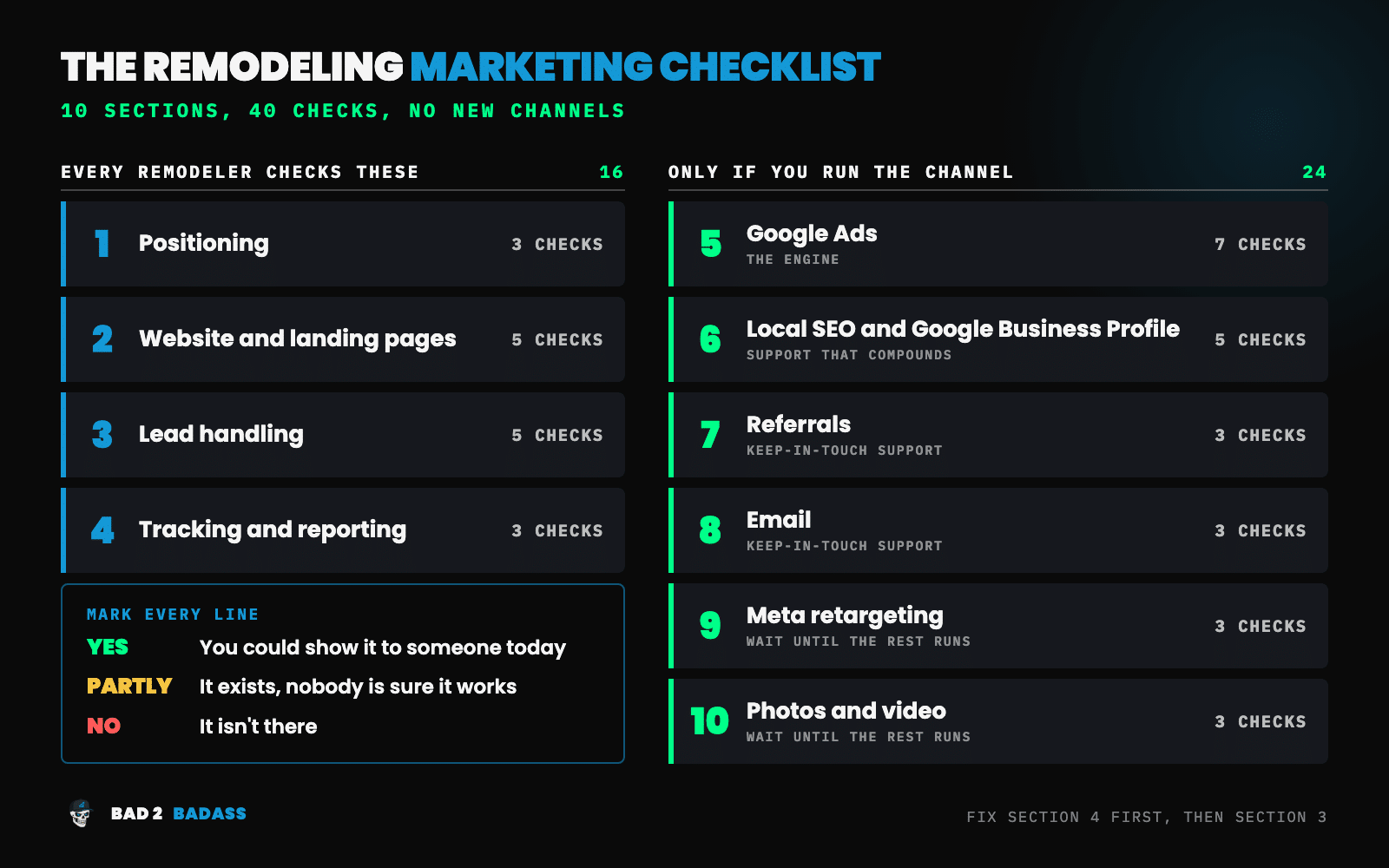
Section 1: Positioning (3 checks)
Positioning is what your ads, your website, and your crew all say about who you work for. Every later section borrows from it.
- You can say in one sentence who you serve, what you build, and where. If it takes you a paragraph, your homepage and your ads are taking a paragraph too.
- Your smallest project is written down and said in public. A dollar figure or a project type, on your site and in your ads, so the homeowner with a small repair knows to call someone else.
- Your homepage doesn’t read like the next contractor’s. Open three competitors’ sites next to yours. If the headlines could be swapped without anyone noticing, mark this No.
There is more on this in how your remodeling brand affects lead quality.
Section 2: Website and landing pages (5 checks)
Every channel you run sends people here, so a weak page taxes all of them.
- You have tested your main pages on a phone and acted on the result. Run your homepage and your busiest service page through Google’s PageSpeed Insights. It reports on mobile and desktop separately. If your site gets enough visitors, it also shows whether the page passes Google’s Core Web Vitals assessment, which is based on real visits.
- The top of the homepage says what you do, where, and for whom. A stranger should get it before scrolling.
- Each main project type has its own page. Kitchens, bathrooms, additions, whole-home. One page each, with photos of your own work.
- Ad clicks land on a page about the project the homeowner searched for. A kitchen ad that opens the homepage makes the homeowner start over. See what a remodeling landing page needs.
- The form and the phone number work, and you tested both this month. Fill in your own form from your phone. Call your own number. See where each one ends up and how long it takes.
The longer version is in how to build a remodeling website that converts.
Section 3: Lead handling (5 checks)
This is the section where I’d expect the most No marks. I call the problem the Leaky Bucket: real projects come in and disappear before a contract.
- Every lead lands in one place, with its source. A CRM, or a spreadsheet if that is what you have. Calls, forms, referrals, and walk-ins all go in the same list.
- A call that comes in while you are on a job site gets answered or gets a text back. A missed-call text-back is the cheap fix.
- You know how long a new lead waits for a first reply. Look at the last ten. If the answer is “whenever I got to it,” mark this No.
- There is a written follow-up schedule for leads who don’t pick up. How many tries, over how many days, by call and by text.
- Every lead has a current status. New, estimate booked, proposal sent, signed, or lost. If the list can’t tell you how many proposals are out right now, it is not being kept.
Section 4: Tracking and reporting (3 checks)
Without this section, every other mark on this marketing checklist is an opinion.
- You can produce four numbers for the last 90 days, for each lead source. Leads, booked estimates, proposals sent, and signed jobs. Count them separately for ads, referrals, your Google Business Profile, and repeat clients. A single total hides which source is carrying the others.
- You know your cost per booked estimate and cost per signed job for each source you pay for. Cost per lead doesn’t count here. A cheap lead that never books an estimate was not cheap.
- Someone updates the numbers on a fixed day each month. One sheet, one person, one date.
The setup is covered in how to track remodeling marketing ROI.
That is the end of the part of the remodeling marketing checklist that everyone checks. Each of the next six sections covers one channel. Check a section only if you run that channel today.
Section 5: Google Ads (7 checks)
For most remodelers selling larger projects, paid search is the engine: the one lead source you can turn up or down. It is also the only section of this marketing checklist I work in, so it gets the most detail.
- The account is yours, and you hold Admin access. Google Ads has five access levels, and Admin is the one that controls who else gets in. An agency should be added to your account, not own it.
- Conversions count real inquiries only. Form submissions and phone calls, not page views or button clicks. For calls, Google lets you set a minimum call length, so a ten-second wrong number isn’t counted as a lead.
- Booked estimates and signed jobs are sent back into the account. Google calls this offline conversion imports, and for new setups it now recommends a method called enhanced conversions for leads. Without it, the account only learns who fills in forms.
- Campaigns are split by project type. Kitchens, bathrooms, and additions each have their own budget and their own ads.
- You have chosen the location setting on purpose. The default, “Presence or interest,” also reaches people who have only shown interest in your area. “Presence” limits your ads to people in or regularly in it. Google recommends the wider default. For a company that only builds within a set drive of its shop, I’d use Presence.
- Someone reads the search terms report on a schedule and adds negative keywords. This is how you stop paying for repairs, DIY questions, and jobs you don’t take. I call that cost the Tire Kicker Tax: the wrong leads come in, and you pay for every one of them.
- You know which recommendations Google is applying on its own. Google Ads can apply some of its own recommendations automatically. The setting is on the Recommendations page, and a History tab there lists what was changed. Mark this No if you have never opened it.
The guide to Google Ads for remodeling businesses covers how the pieces fit together.
Section 6: Local SEO and Google Business Profile (5 checks)
This is the support that compounds. It is slow, it costs little, and it keeps paying after the work is done. Google says local results are based mainly on relevance, distance, and prominence, and its own tips for improving your local ranking line up with most of the checks below.
- Your profile is verified, and someone at your company controls the login. Not a former employee, and not an agency you left.
- The information is complete and correct. Hours, phone, website, services. Google says businesses with complete and accurate information are more likely to show up in local results.
- Your address matches how you work. If homeowners don’t come to your office, Google’s instruction is to remove the address from the profile and list the areas you serve. You can add up to 20, by city or postal code.
- You ask for a review on every finished job, and you reply to every review. Google gives you a link or QR code to send. It also prohibits offering anything in exchange for a review, so if a discount or a gift card is part of your ask, mark this No.
- Recent photos of your own work are on the profile. Jobs from the last few months, not the set you uploaded on the day you claimed it.
For the rest of it, see local SEO for remodeling businesses.
Section 7: Referrals (3 checks)
Past clients and trade partners already trust you. The check here is whether asking them is a habit or an accident.
- The referral offer fits on one page. Who can refer, what they get, and when they get it.
- The ask happens at the same point on every job. The final walkthrough is the usual place. If it depends on who remembers, mark it Partly.
- Referred leads are labeled as referrals in your lead list. Otherwise Section 4 can’t tell you what referrals are worth.
The full method is in how to build a referral program.
Section 8: Email (3 checks)
Email keeps you in front of people you have already met: past clients, and homeowners who got an estimate and went quiet.
- Past clients and old leads are on one list you can send to. Not spread across your phone, your inbox, and an old spreadsheet.
- Something goes out on a regular schedule. Once a month is plenty. A finished project and a short note will do.
- Every email has a way to unsubscribe and your postal address. The FTC’s CAN-SPAM compliance guide requires a valid physical postal address and a clear way to opt out, and it gives you 10 business days to honor an opt-out request.
The how-to is in email marketing for remodelers.
Section 9: Meta retargeting (3 checks)
Retargeting shows ads on Facebook and Instagram to people who already visited your site. The remodeling marketing plan says to leave it out until your engine and both supports run on their own. If you are not running it, skip this section. You lose nothing.
- The Meta Pixel is on your site, and Events Manager shows it receiving page views. The pixel is a piece of code that records visits. If Events Manager shows nothing coming in, your ads have no one to follow.
- People who already booked or signed are not seeing the ads. Paying to chase a homeowner whose kitchen you are already building is money spent on nothing.
- You can say what it cost last month and whether anyone it reached booked an estimate. If you can’t, that is a Section 4 problem, and it gets solved before this channel gets more budget.
The setup is in Facebook retargeting for remodeling leads.
Section 10: Photos and video (3 checks)
Posting video on a schedule is on the same wait-until-later list. If you don’t post, skip this section, with one exception. The first line is worth checking either way, because your website and your Google Business Profile need the same photos.
- Every finished job is photographed before and after, from the same spots. Filed by project type, where someone other than you can find them.
- You have the homeowner’s written permission to use the photos. A line in your contract is the simplest way to get it.
- If you post video, it has an owner and a schedule. One person and one day of the week. If posting depends on a slow afternoon, mark it Partly.
There is more in video marketing for remodeling contractors.
What to do with your marks
Count the No marks and the Partly marks in the sections you checked. Treat a Partly as a No until someone shows you the thing working.
Then put them in order. Don’t work down the marketing checklist from Section 1. I’d fix them in this sequence:
- Section 4 first. Until you have the four numbers, you can’t tell which of the other No marks is costing you jobs.
- Section 3 next. The leads you already have are the cheapest ones to save.
- Sections 1 and 2. What you say, and where people land when they click.
- Your engine. For most readers that is Section 5.
- Your two supports. Section 6, then Sections 7 and 8.
- Sections 9 and 10 last. If the sections above still have No marks, the better move may be to pause retargeting or posting until they don’t.
That is the same order the remodeling marketing plan uses: see the leaks, stop the leaks, then the engine, then the supports.
Take on three fixes at most in any 90 days, each with a name and a date next to it.
Then run the marketing audit again in 90 days. A Yes doesn’t stay a Yes on its own. Forms break. Tracking stops recording. Someone leaves, and the review ask leaves with them.
Wrapping it all up
A remodeling marketing checklist is not a list of things to add. It is a way to find out which of the things you already pay for are doing their job.
To recap:
- Mark all 40 lines of the marketing checklist Yes, Partly, or No, and skip the sections for channels you don’t run.
- Sections 1 to 4 apply to everyone: positioning, website, lead handling, and tracking.
- Sections 5 to 10 each cover one channel: Google Ads, local SEO, referrals, email, Meta retargeting, and photos and video.
- Fix tracking first, then lead handling, then positioning and website, then your engine, then your supports.
- Three fixes per 90 days, then mark the list again.
Start with Section 4. It is three lines, and it decides how much you can trust the other 37.
Want a second opinion on Section 5 of your remodeling marketing checklist?
I work in one of these ten sections. I run paid search (Google Ads and Microsoft Ads) for remodeling companies selling $20K+ projects. I don’t do SEO, Google Business Profile, social media, email, CRM setup, websites, or video, so the other nine sections stay with you or with someone else.
Every engagement starts with the BAD-ectomy™, a $297 diagnosis delivered in 5 business days. It looks at your paid search and at what happens to those leads afterward. You get the three biggest things holding back growth, a map of where opportunities are leaking, and a 90-day plan for what to fix first. Nothing in your account gets changed, and the findings are yours whether or not we work together.
Not ready for that? Book a discovery call.