Houzz for remodeling lead generation works differently from most places a homeowner can find you. On Google, someone types what they want and picks from a list. On Houzz, many homeowners start by saving photos of kitchens and bathrooms they like, sometimes long before they are ready to call anyone. That changes what the platform can do for you and how you should judge it.
One thing up front. I run paid search for remodeling companies. I don’t manage Houzz profiles or Houzz advertising, and nothing below comes from running Houzz for a client. This is a marketer’s read of how Houzz says it works, checked against Houzz’s own help pages, plus the way I’d judge Houzz leads or any other kind: by booked estimates and signed jobs.
There are five steps. The first three take time, and none of them requires paying Houzz. The last two tell you whether Houzz deserves more of your time or any of your money.
How Houzz decides which remodelers a homeowner sees
Houzz says it shows professionals through organic and paid placements, and that the paid ones carry a “sponsored” label.
For the unpaid listings, Houzz names three things that set the order:
- Category. Your service type, your professional type, and your location.
- Relevancy. Distance, how well the homeowner’s search matches the words in your description, and how close the style of your project photos is to the photos that homeowner has saved.
- Content quality. The number of reviews you have, and the number of your photos that homeowners have saved to ideabooks. An ideabook is a homeowner’s saved collection of photos.
For sponsored listings, Houzz says the order depends mainly on category, relevancy, and customer status. The example it gives of customer status is the price paid for the advertising. Content quality is not on that second list.
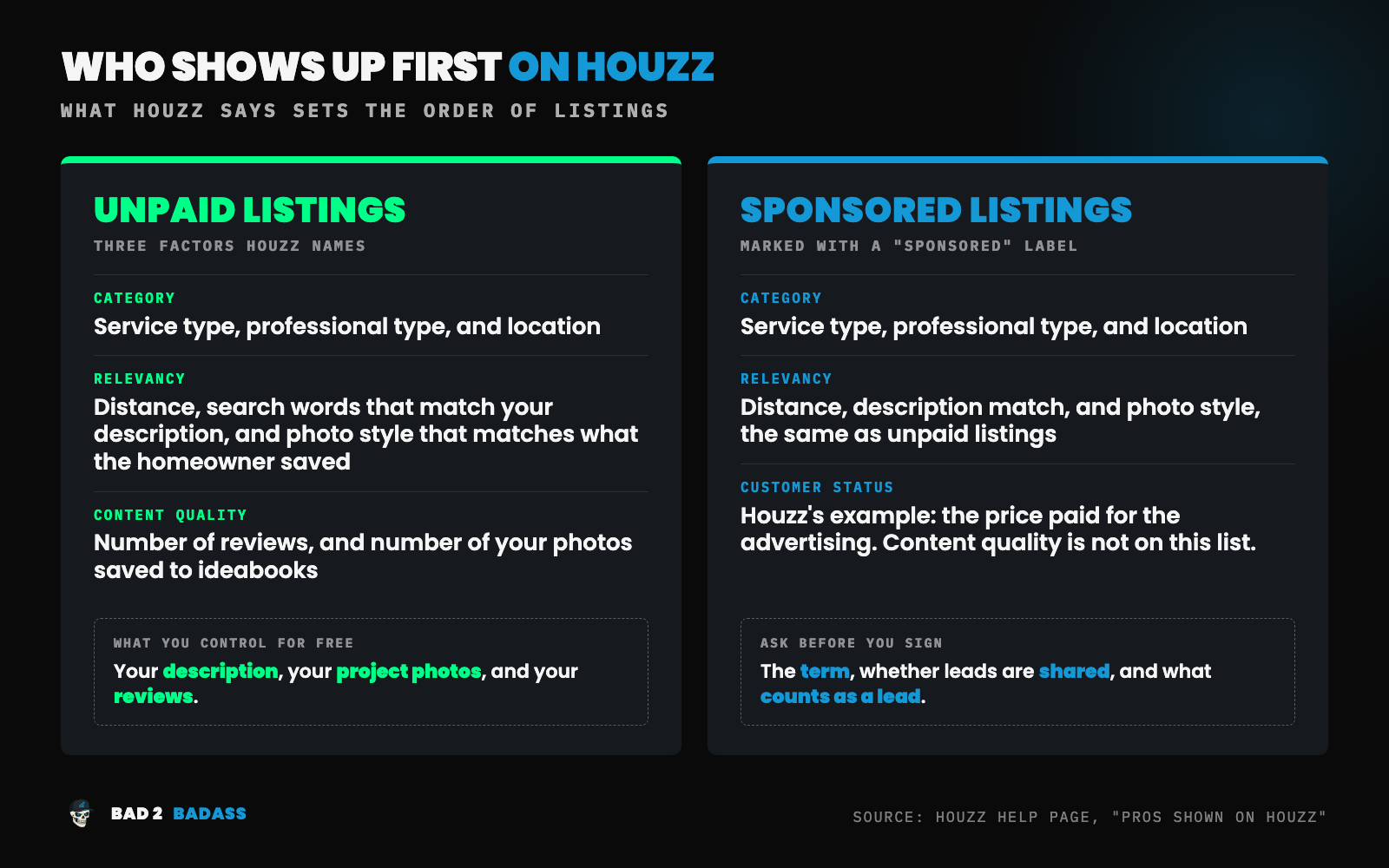
Read the unpaid list as a to-do list. The parts you control without paying are your description, your project photos, and your reviews. Steps 1 to 3 below are those three things, in that order.
When Houzz for remodeling lead generation is a good fit, and when it isn’t
This section is my judgment, based on how the platform is built. It is not a rule, and your own numbers outrank it.
Houzz for remodeling lead generation tends to suit a company that:
- Does work that photographs well. Kitchens, bathrooms, additions, and whole-home remodels.
- Has finished projects with good photos, or is willing to pay to have them shot.
- Sells design as part of the job. A homeowner browsing by style is choosing a look before choosing a contractor.
- Can wait. A Houzz profile builds slowly, the same way reviews do.
It tends to be a poor fit when:
- The work has nothing to show in a photo. Repairs, structural work, and mechanical work.
- There are few finished photos and no plan to get more.
- You need estimates on the calendar this month.
- Nobody will answer a Houzz message quickly.
The point about needing estimates this month matters most. A Houzz profile can’t be turned up when the schedule is thin. If you need leads on demand, that is a job for a source you control, which for most remodelers selling larger projects is paid search. The guide to Google Ads for remodeling businesses covers how that works.
So I’d plan for Houzz as a support and not as the main source of leads. The remodeling marketing plan post explains the difference between an engine and a support.
Step 1: Build the free Houzz profile all the way out
Houzz lets a remodeling company create a free business account, and says doing so adds the business to its Find Professionals directory. Start there, and finish it. A half-built Houzz profile gives the platform very little to match against a homeowner’s search.
Houzz’s own profile guides list these sections. Fill in every one:
- Business name, and the category that describes your work
- A business description
- Services provided and areas served
- Typical job cost
- License number, certificates, and awards
- Website link, logo, and cover photo
Two of those do more work than the rest.
The description. Houzz matches a homeowner’s search against the words in your description, so write it in the words a homeowner would use. “Kitchen and bathroom remodeling in [Your City] and the towns around it” gives Houzz something to match. “Full-service general contractor” does not.
Typical job cost. Put in your real range. A homeowner planning a small job can see that you are not the right call, and that saves you both a conversation. I call the cost of those wrong-fit leads the Tire Kicker Tax, and this field is a free way to lower it.
The website link sends homeowners to your own site, so check the page they land on. See how to build a remodeling website that converts.
Step 2: Add projects with photos a homeowner can find
On Houzz, a project is a set of photos and details that sits under your public Houzz profile. Homeowners find and save individual photos, so each photo needs its own details.
Houzz’s guidelines for photo keywords say to list 5 to 15 keywords per photo. They should describe what is visible: materials, colors, style, and specific products. Houzz also says not to use the names, locations, or services of the professionals involved as photo keywords.
So a kitchen photo gets keywords such as “white oak island,” “quartz countertop,” and “transitional kitchen.” It does not get “[Your City] kitchen remodeler.” Your location belongs in the Houzz profile you built in Step 1.
A few more points:
- Start with your best three to five projects. A small set of strong projects is a better start than everything you have ever built.
- Use good photos. Houzz says the projects that do best share professional photos, good lighting, and relevant keywords and descriptions. There is more on shooting your own in before and after photos for remodeling marketing.
- Write a short description for each project. Houzz suggests explaining the important decisions you made.
- Upload the kind of work you want more of. Houzz matches the style of your photos to what a homeowner has saved. A portfolio full of small jobs will be matched to people planning small jobs.
Step 3: Ask past clients for Houzz reviews
The number of reviews is one of the factors Houzz names for unpaid listings. Houzz also lets a homeowner re-sort the list by most reviewed or recently reviewed. So both the count and how recent the reviews are can move you.
Houzz has a review request tool that emails your client an invitation. Add a personal note. Ask at the final walkthrough, when the client is standing in the finished room.
You are probably asking for a Google review at the same moment, and two reviews is a lot to ask of one client. My suggestion: if the client found you on Houzz or planned the project there, ask for the Houzz review. Ask everyone else for Google first. The Google side is covered in how to get Google reviews for your remodeling business.
Know the rules before you ask. Houzz’s review policy says:
- The reviewer needs first-hand experience with your company.
- Owners, employees, and relatives can’t review the business.
- Only one person per household reviews a given project.
- Any payment or incentive the reviewer received has to be stated clearly in the review.
Federal rules apply too. The FTC’s rule on fake reviews prohibits paying for reviews that have to express a particular opinion. The safe version is simple. Ask every client the same way, offer nothing in return, and never ask for “a five-star review.”
Reviews also feed the Best of Houzz awards, which Houzz describes as free and automatic. Treat the badge as a by-product.
Step 4: Count Houzz leads by source
A Houzz profile will produce activity: profile views, saved photos, and messages. None of that is the result. The result is a booked estimate, and then a signed job.
To see it, every lead needs a source written down at first contact.
- Messages that arrive through Houzz are already labeled. Log them as Houzz leads.
- Phone calls and website forms are not. Ask “How did you find us?” every time, and write down the answer.
- Answer quickly. A homeowner who messages you on Houzz can message three other remodelers just as easily. A missed-call text-back covers the calls you can’t pick up.
Then count the same four numbers you count for every source: leads, booked estimates, proposals sent, and signed jobs. The remodeling marketing funnel explains each stage.
Here is a made-up example. Over six months, a remodeler logs 12 Houzz leads. Four book an estimate, three get a proposal, and one signs. The profile took 15 hours to build and about an hour a month to keep up, which is 21 hours in total.
So the free Houzz profile cost 21 hours and produced one signed job. Whether that is good depends on what the job was worth and what else those hours could have done. Either way, it is a real answer.
Give it two quarters before you judge. Remodeling sales are slow, and one month of Houzz leads tells you almost nothing. The spreadsheet setup is in how to track remodeling marketing ROI.
Step 5: Judge Houzz Pro and paid advertising with your own numbers
Houzz Pro is mostly business software. Houzz lists a CRM, estimates, proposals, invoices, scheduling, and online payments, along with marketing features such as a premium profile, a custom website, and email marketing. Its pricing page lists advertising as a separate package on top of the software plans.
Plan names and prices change, so read that page yourself.
That makes two separate decisions.
The software. This is a question about how you run jobs, not about leads. Judge it against the tools you already use.
The advertising. Houzz says you choose your service areas, services, project types, and preferred budget ranges, and your business appears as a sponsored listing. This is the real Houzz for remodeling lead generation decision, and it should be made with the numbers from Step 4.
Before you sign, I’d ask Houzz these questions and get the answers in writing:
- What is the term, and what does it cost to leave early? At the time of writing, the pricing page says the Houzz Pro free trial runs 30 days and an annual subscription begins when it ends. Ask how that applies to the advertising package, and whether a shorter term is available.
- Is each lead sent only to me, or to other pros as well? Shared leads behave very differently, as I explain in why I don’t recommend HomeAdvisor or Angi.
- What counts as a lead? A message, a phone call, or a profile view.
- Can I limit Houzz leads by project budget and by town?
- Will I get each lead’s contact details, so I can match them to estimates and signed jobs?
Then do the math. Add up everything you paid Houzz over the period and divide by the signed jobs that came from Houzz leads. That is your cost per signed job. In the made-up example, the free Houzz profile produced one signed job in six months. Paid advertising has to add jobs beyond that one to earn its fee.
A 30-day trial is long enough to judge the software. It is not long enough to judge the advertising, because few larger remodeling projects go from first message to signed contract in a month.
One comparison with paid search is worth making. A sponsored directory listing stops when you stop paying, and the homeowner found the directory before they found you. I put that on the rented side of owned leads versus rented leads. In a Google Ads account you choose the searches, see what each click cost, send the homeowner to your own site, and can pause on any day. With a subscription you commit first and learn afterward. Neither is right for every company. Cost per signed job, by source, is how you find out which is right for yours.
Wrapping it all up
Houzz for remodeling lead generation is a slow, low-cost support for a remodeler with good photos and patient expectations. It is not a switch you flip when the calendar is empty.
To recap, the 5 steps to use Houzz for remodeling lead generation are:
- Build the free Houzz profile all the way out.
- Add projects with photos a homeowner can find.
- Ask past clients for Houzz reviews.
- Count Houzz leads by source.
- Judge Houzz Pro and paid advertising with your own numbers.
Do Steps 1 to 3 once and keep them current. Don’t pay Houzz for anything until Step 4 has given you two quarters of numbers.
Do you know which lead sources are producing your signed jobs?
I don’t manage Houzz profiles or Houzz advertising, so the steps above stay with you or with someone else. What I do is paid search: Google Ads and Microsoft Ads for remodeling companies selling $20K+ projects.
Every engagement starts with the BAD-ectomy™, a $297 diagnosis delivered in 5 business days. It looks at your paid search and at what happens to those leads afterward. You get the three biggest things holding back growth, a map of where opportunities are leaking, and a 90-day plan for what to fix first. Nothing in your account gets changed, and the findings are yours whether or not we work together.
Not ready for that? Book a discovery call.