Google Ads for bathroom remodelers has a problem that kitchens and additions mostly don’t. The word “bathroom” covers everything from a leaking faucet to a full primary suite. Bid on it and you are in the same auction as plumbers, tub refinishers, big-box stores, and DIY videos. Left alone, a bathroom campaign fills your phone with small jobs.
So this guide is built around one idea: get the campaign to find the bathroom projects you want, and keep the rest out. There are seven steps, in the order I’d do them. None of them is hard. Most accounts just skip them.
If you are new to the platform, start with the guide to Google Ads for remodeling businesses. This post assumes you know what a campaign and a keyword are.
Why Google Ads for bathroom remodelers attracts the wrong leads
Google matches your keywords to searches it considers related, and for bathrooms that net is wide. A keyword like “bathroom remodel” can show your ad to someone who wants a vanity swapped, a tub reglazed, or a how-to video.
Each of those clicks costs money. Some turn into calls, and each call costs time. I call this the Tire Kicker Tax: you pay for the click, then you pay again in the hours spent on leads that were never going to be a project you want.
Most of the steps below are a filter of one kind or another. That is deliberate. With bathroom remodeling leads, what you keep out matters as much as what you bring in.
Step 1: Decide which bathroom jobs you want before you spend anything
Write down four things before you open Google Ads:
- The projects you want. For example: full bathroom remodels, primary suites, accessible bathrooms.
- The projects you don’t. Repairs, single-fixture swaps, refinishing, tile-only work.
- Your minimum job size. A real number, in dollars.
- Where you will work. The towns or zip codes, not a rough circle on a map.
This list drives every later step: the keywords, the blocked searches, the ad copy, and the form on your page. If you will take anything, the campaign will find you anything.
Step 2: Give bathrooms their own campaign
Don’t run bathrooms inside a general “remodeling services” campaign. A separate campaign gives bathrooms their own budget, their own ads, and their own numbers, so you can see what a bathroom lead costs without kitchens mixed in.
A simple structure:
- Campaign: Bathroom Remodel | Search | [Your City]
- Ad groups, by theme: general bathroom remodeling, primary bathrooms, and one each for showers or accessible bathrooms if they are on your Step 1 list
Then change three settings Google chooses for you:
- Locations. Target the towns or zip codes from Step 1. A radius usually includes places you would never drive to.
- Location option. Set it to “Presence.” The default, “Presence or interest,” also reaches people who have shown interest in your area without being in it. Google explains both in its advanced location options.
- Networks. Untick the Display Network and Search partners at launch. Google usually has both ticked when you create a search campaign. You want your ads on Google searches, where you can see exactly what was typed.
For how much to put behind it, see the right Google Ads budget for a remodeling business.
Step 3: Pick keywords by what the homeowner is ready to do
Sort bathroom searches into three groups.
Ready to hire. Start here.
- bathroom remodeler [Your City]
- bathroom remodeling contractor
- bathroom remodel company near me
- primary bathroom remodel [Your City]
- bathroom renovation contractor
Still pricing. Add these later, in their own ad group.
- bathroom remodel cost [Your City]
- how much does a bathroom remodel cost
Just looking. Leave these out.
- bathroom ideas
- small bathroom designs
- bathroom pictures
Start with phrase match and exact match. Broad match lets Google decide what counts as related, and for the word “bathroom” that includes a lot you don’t want. Consider it later, once the account is being told which leads became booked estimates (Step 7).
Step 4: Build the negative keyword list before you launch
A negative keyword tells Google which searches should never show your ad. With Google Ads for bathroom remodelers, this is the step that does the most work, and it should be done before the first dollar is spent.
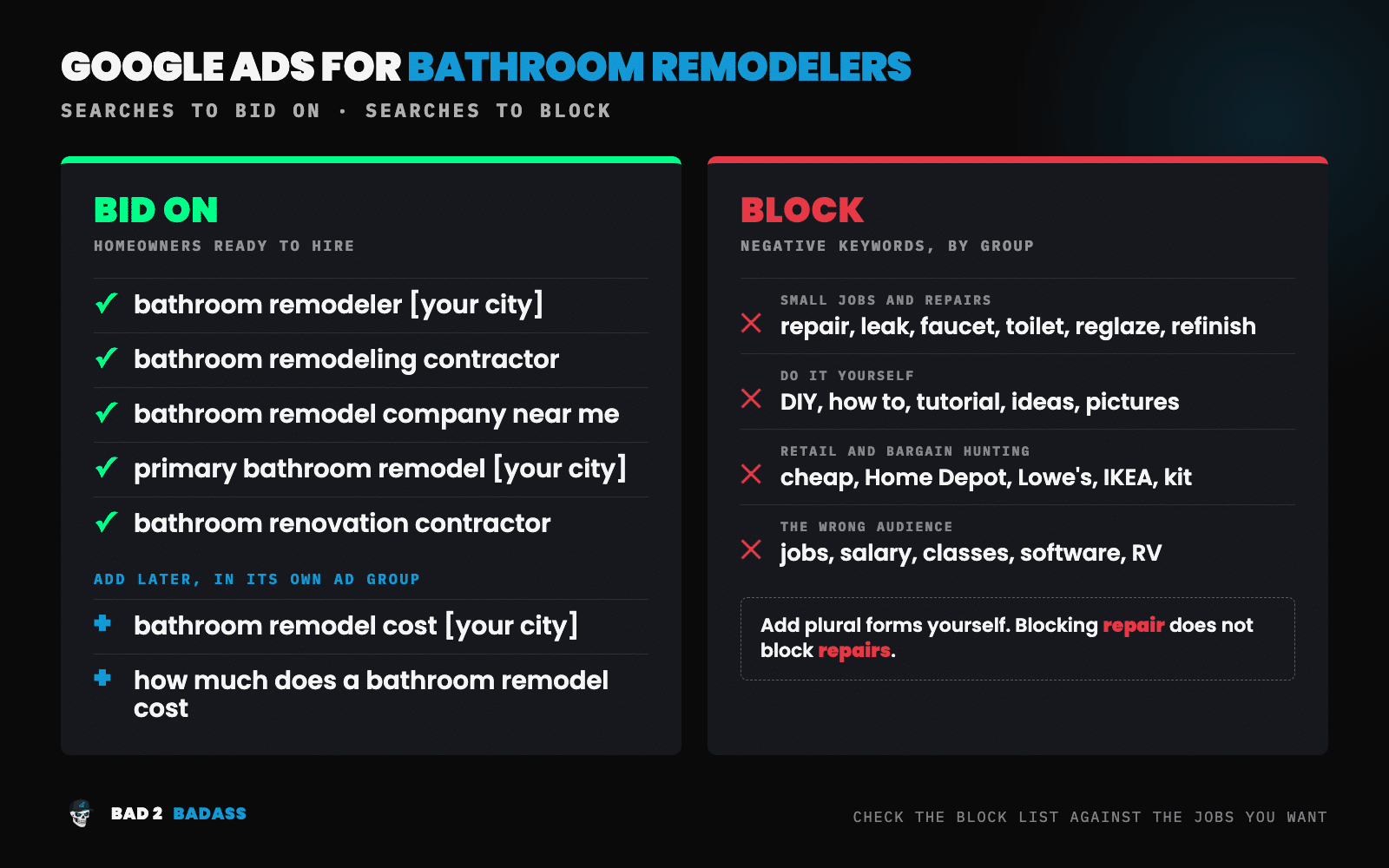
Build the list in four groups:
- Small jobs and repairs: repair, leak, clogged, faucet, toilet, reglaze, refinish, resurfacing, grout, caulk
- Do it yourself: DIY, how to, tutorial, ideas, inspiration, pictures
- Retail and bargain hunting: cheap, Home Depot, Lowe’s, IKEA, kit, wholesale, used
- The wrong audience: jobs, salary, careers, classes, software, mobile home, RV
Check the list against Step 1 before you load it. Anything you do want comes off. If you take refinishing work, for example, remove “reglaze,” “refinish,” and “resurfacing.” If you will not take a job under your minimum, “cheap” stays on.
One detail catches people out. Google says negative keywords don’t cover close variants, so you have to add singular and plural forms and synonyms yourself. Blocking “repair” does not block “repairs.”
After launch, open the Google Ads search terms report every week for the first 90 days and add what you find. The method is in the 90-minute Google Ads audit for remodelers.
Step 5: Write ads that screen as well as sell
Every click costs money, so the ad has two jobs. It should pull in the homeowner you want and put off the one you don’t.
- Say exactly what you do. “Full Bathroom Remodels” screens better than “Bathroom Services.”
- Name the place. “[Your City] Bathroom Remodelers.”
- Say where projects start, if you are willing to. A line such as “Projects From $25K,” using your own minimum, will cost you clicks. They are the clicks you didn’t want.
- Use proof you can back up. Years in business, bathrooms completed, your review rating. Use only numbers that are true. Homeowners check.
Google’s responsive search ads mix your headlines in different orders. Pin the headline that says what you do to the first position, so it always shows.
Add image assets with photos of your own bathrooms, a call asset with your phone number, and sitelinks to your gallery, your process, and your reviews. There is a fuller walkthrough in how to write Google Ads for remodeling contractors.
Step 6: Send every click to a bathroom page
Bathroom ads should never land on your homepage. Send them to a page that is only about bathrooms and has one job, which is getting the right homeowner to ask for an estimate.
The page needs:
- A headline that matches the ad the homeowner just clicked
- Photos of real bathrooms you built, with before and after shots where you have them
- What your bathroom projects typically cost and how long they take, in your own ranges
- Reviews from bathroom clients
- A phone number that can be tapped on a phone
- A short form with one screening question, such as “What are you planning?” with your project types as the choices
That last item is your third filter, after the negative keywords and the ad. It also tells you what the lead is before you call back.
Page quality affects cost as well. Landing page experience is one of the three parts of Quality Score, which influences what you pay per click. The full build is in how to build a remodeling landing page that converts.
Step 7: Track to the signed job, then bid on what you track
Count every call and every form as a conversion, tagged with the campaign and keyword it came from. Call tracking for a remodeling business covers the phone side.
Then record which leads became booked estimates and which became signed jobs, and send that back to Google. Google lets you import sales outcomes into the ad account. This matters a great deal for bathrooms. An account that only sees form fills will chase the cheapest form fills, and for bathroom searches those are the small jobs.
On bidding, keep it simple at the start. With little data, use Maximize Conversions or manual bidding and watch the search terms closely. Move to a target cost per conversion, which Google Ads calls Target CPA, once real conversions come in steadily. The options are compared in Google Ads bidding strategies for remodeling businesses.
Set a routine:
- Weekly, for the first 90 days: read the search terms and add negative keywords.
- Monthly: check cost per booked estimate and cost per signed bathroom job, pause keywords that produce calls but no estimates, and refresh ads that have gone stale.
What to expect in the first 90 days
The first few weeks are messy. The search terms report will show searches you never wanted, and that is useful. Each one becomes a negative keyword, and the campaign gets cleaner every week.
Judge the campaign on booked estimates for the projects on your Step 1 list. Don’t judge it on lead count or cost per lead. A filtered bathroom campaign can produce fewer leads at a higher cost each, with more of them worth quoting. That trade is the point.
If the estimates are for the wrong jobs after 90 days, go back to Steps 1 and 4 before you touch the budget. For how leads, estimates, and signed jobs fit together, see the remodeling marketing funnel.
Wrapping it all up
Google Ads for bathroom remodelers works when the campaign is told, at every step, which bathroom jobs you want.
To recap, the 7 easy steps to run Google Ads for bathroom remodelers are:
- Decide which bathroom jobs you want before you spend anything.
- Give bathrooms their own campaign.
- Pick keywords by what the homeowner is ready to do.
- Build the negative keyword list before you launch.
- Write ads that screen as well as sell.
- Send every click to a bathroom page.
- Track to the signed job, then bid on what you track.
If you only have time for two of them this week, do Steps 1 and 4.
Already running Google Ads for bathrooms and getting small jobs?
That is what the BAD-ectomy™ is for. It is a $297 diagnosis of your paid search, delivered in 5 business days. You get the three biggest things holding back growth, a map of where opportunities are leaking, and a 90-day plan for what to fix first. Nothing in your account gets changed, and the findings are yours whether or not we work together.
I work with remodeling companies selling $20K+ projects. If most of your bathroom work is below that, the steps above will still serve you well on your own.
Not ready for that? Book a discovery call.